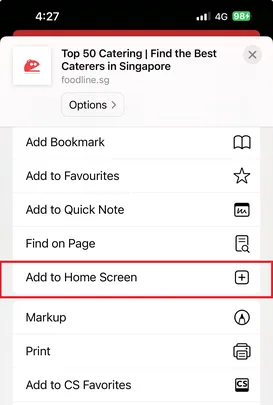
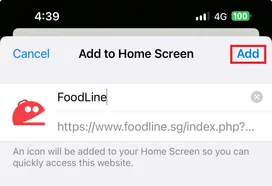
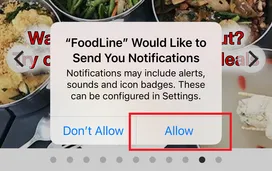
FoodLine “Lucky Ang Pao Spin” Campaign 2026 T&Cs
The FoodLine Lucky Ang Pao Spin Campaign 2026 is organised by FoodLine to reward customers during the festive period. By participating, you agree to these Terms & Conditions.
Campaign Period
- Campaign duration: 6 Jan 2026, 19 Jan 2026 and 17 Feb 2026.
- Eligible customers will receive an SMS with a campaign link.
- SMS sends:
6 Jan 2026 — link valid until Sunday, 11 Jan 2026
19 Jan 2026 — link valid until Sunday, 25 Jan 2026
17 Feb 2026 — link valid until Sunday, 22 Feb 2026
Eligibility
-
Open to customers who access the Spin via FoodLine’s official links.
-
No purchase required to spin the wheel. However, purchase might be required to be eligible to receive the spin wheel link.
-
Participation limits (if any) will be stated in the spin invitation.
-
FoodLine may disqualify any abuse or suspicious activity.
Prizes & Credit
-
Prizes are awarded digitally.
-
Prizes are auto-credited to the FoodLine account tied to the email/mobile number used.
-
Check your prizes in FoodLine Dashboard.
-
Prizes are non-transferable and not exchangeable for cash unless otherwise stated.
Coupon Codes (T&Cs)
-
1 coupon code per order.
- Some coupon codes have limited redemptions and are first-come, first-served.
-
Once fully redeemed, the code will no longer be valid, and no replacement / extra chances will be issued.
-
Coupon code can only be used once per customer.
-
Coupon codes cannot be used with other promotions/discounts.
-
FoodLine reserves the right to amend the T&Cs and its decision is final.
- All promo codes are valid until 30 June 2026.
FL Coins (T&Cs)
-
FL Coins are credited to your FoodLine account.
-
FL Coins can be used to offset eligible orders at checkout (subject to FoodLine’s prevailing rules).
-
FL Coins cannot be withdrawn or transferred.
-
FoodLine may update FL Coin rules at any time.
General
-
FoodLine may amend mechanics, substitute prizes, or disqualify participants who breach these Terms.
-
FoodLine’s decision is final.
Frequently Asked Questions
FL Coupon Codes
Is the Coupon Amount paid on top of the FoodLine Cash Reward?
The Coupon will replace the FoodLine Cash Reward. The coupon amount will be issued to you after the event, once your review has been submitted.
How long does it take for FoodLine to transfer the Coupon Amount?
The Coupon Amount will be processed within 3-5 working days.
FL Coins
What are FL Coins?
FL Coins are FoodLine reward points. For online payments, FL Coins can be used to offset the price directly.
Where can I check my FL Coins?
Log in to your FoodLine account and go to My FL Coins.
How do I use my FL Coins?
Use FL Coins during checkout on eligible orders to offset your order amount (subject to FoodLine’s prevailing rules).
How many FL Coins can be used per order?
You can use your FL Coins to claim up to 10% of the order amount, capped at $100.
Example 1: For order amount of $200, the maximum FL Coins you can use is 2,000 FL Coins (worth $20 < 10% of $200)
Example 2: For order amount of $2000, the maximum FL Coins you can use is 10,000 FL Coins (worth $100 < 10% of $2000 capped at $100)
Can I transfer FL Coins to someone else?
No, FL Coins cannot be transferred from one account to another.


 and revisit our site to complete the process.