Get $5 Coupon Code (no min. spend) Sign up now

Top
FoodLine x UOB Credit Card Acquisition Campaign (Coupon Code T&Cs)

FoodLine x UOB Credit Card Acquisition Campaign (Coupon Code T&Cs)

How to use your coupon code?

 Step 1: Order from any caterer on FoodLine here https://www.foodline.sg/
 Step 2: Before submitting your order, indicate the Coupon Code in the “Coupon Code” field.
 Step 3: The amount will be deducted if the coupon code is valid.

Sign up for a new UOB credit card and spend a min of $300 within 30 days of card approval date to receive: 6 x $10 FoodLine coupon codes
Sign up here!

 *T&Cs of coupon code
• Each successful applicant will receive 6 unique coupon codes and each code can only be used once. 
• 1 coupon code per order and coupon code can only be used once per customer.
 • The coupon codes are valid for all orders on FoodLine.
 • No min spending is required.
 • The coupon codes are not stackable and cannot be used in conjunction with any other promotions/discounts.
 • The Management reserves the right to amend T&Cs and its decision is final.
• The coupon codes are valid for 6 months.
• The coupon codes are direct deduction coupons. 

 Frequently Asked Questions
 • Is the Coupon Amount paid on top of the FoodLine Cash Reward? 
The coupon codes are direct deductions, hence the coupon amount is paid on top of the FoodLine Cash Reward. Enjoy additional cash reward when you leave a review after your event!
 • Can the coupon code be stacked on top of existing promotions? 
 The coupon code cannot be used in conjunction with other promotions/discounts.

About the author
Promotions
7th Month Catering Checklist Promo T&Cs (Mailing List Exclusive)

7th Month Catering Checklist Promo T&Cs (Mailing List Exclusive)

How to use your coupon code?
 Step 1: Order from any catering menus listed in the mailing list on FoodLine.
 Step 2: Before placing your order, indicate the Coupon Code in the “Coupon Code” field. (Can be found in the email)
 Step 3: After your event, go to the cash reward page. Follow the...
7th Month Day 1 Reminder Promo T&Cs (Mailing List Exclusive)

7th Month Day 1 Reminder Promo T&Cs (Mailing List Exclusive)

How to use your coupon code?
 Step 1: Order from any catering menus listed in the mailing list on FoodLine.
 Step 2: Before placing your order, indicate the Coupon Code in the “Coupon Code” field. (Can be found in the email)
 Step 3: After your event, go to the cash reward page. Follow the...
Rewardz x FoodLine Promo Code T&Cs

Rewardz x FoodLine Promo Code T&Cs

How to use your coupon code?
 Step 1: Order from any catering menus on FoodLine.
 Step 2: Before placing your order, indicate the Coupon Code in the “Coupon Code” field. (Can be found in the email)
 Step 3: After your event, go to the cash reward page. Follow the instructions...
Pin Si Kitchen Mini Buffet Review - 7th Month Popular Menu

Pin Si Kitchen Mini Buffet Review - 7th Month Popular Menu

Finding reliable catering during the peak 7th Month (Hungry Ghost Festival) season in Singapore can be a challenge. You need a setup that pleases a crowd, holds up well during delivery, and fits your headcount and budget without fuss. Available on FoodLine.sg for delivery between ...
8 Best Budget-Friendly 7th Month Catering Menus Under $10/Pax

8 Best Budget-Friendly 7th Month Catering Menus Under $10/Pax

Planning food for a 7th Month prayer or gathering in Singapore does not necessarily mean spending heavily on a large buffet. If you are organising a workplace prayer, family gathering or a simple get-together after the offerings, there are plenty of affordable catering options that can keep your food budget...
How Much Does a Tingkat Meal Plan Cost in Singapore? Prices & Plans Explained

How Much Does a Tingkat Meal Plan Cost in Singapore? Prices & Plans Explained

If you're considering Tingkat delivery in Singapore, one of the first things you'll probably want to know is how much a Tingkat meal plan costs. There isn't one standard Tingkat price. What you pay depends on the caterer, number of people, number of delivery...
A customer just ordered for 25 pax for 6th Sep, 1:00PM
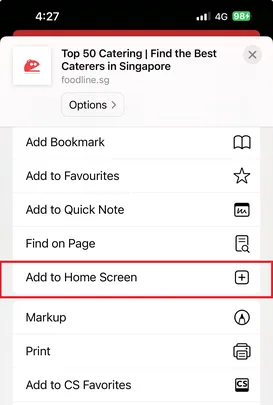
Note: To claim your $10 discount, please follow the steps below:

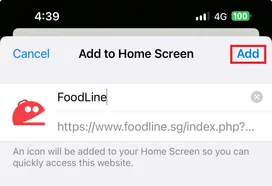
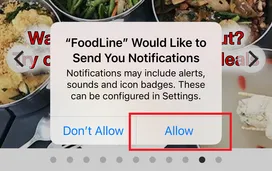
iPhone Users Exclusive - How to claim $10 Off with FoodLine

Step 1: Tap the share icon on iPhone and then Add to Home Screen
Step 2: Tap Add
Step 3: Open the FoodLine App, and tap Allow. The promo code will then be sent to you via Notifications.
Home
Promos
1,131
Menus
999+
Chat / Call
Chat / Call
Account