Biggest Discounts
All Merchant Menus cheaper than anywhere else!

Get $5 Coupon Code (no min. spend) Sign up now

Top
Video Call Background Images You Can Use for Phase 2

Video Call Background Images You Can Use for Phase 2

Back to doing more video calls from home for work meetings on Zoom, Microsoft Teams, Google Meet or others? Having an appropriate and professional background to do the video call is essential in leaving a good impression and preventing visual distractions. With a great background, you will also be more focused and confident during presentations. Below are a few video call background images that you can check out. Go ahead to save the images from this article or go to the source listed under each image to download.

Spacious Home Studio Look
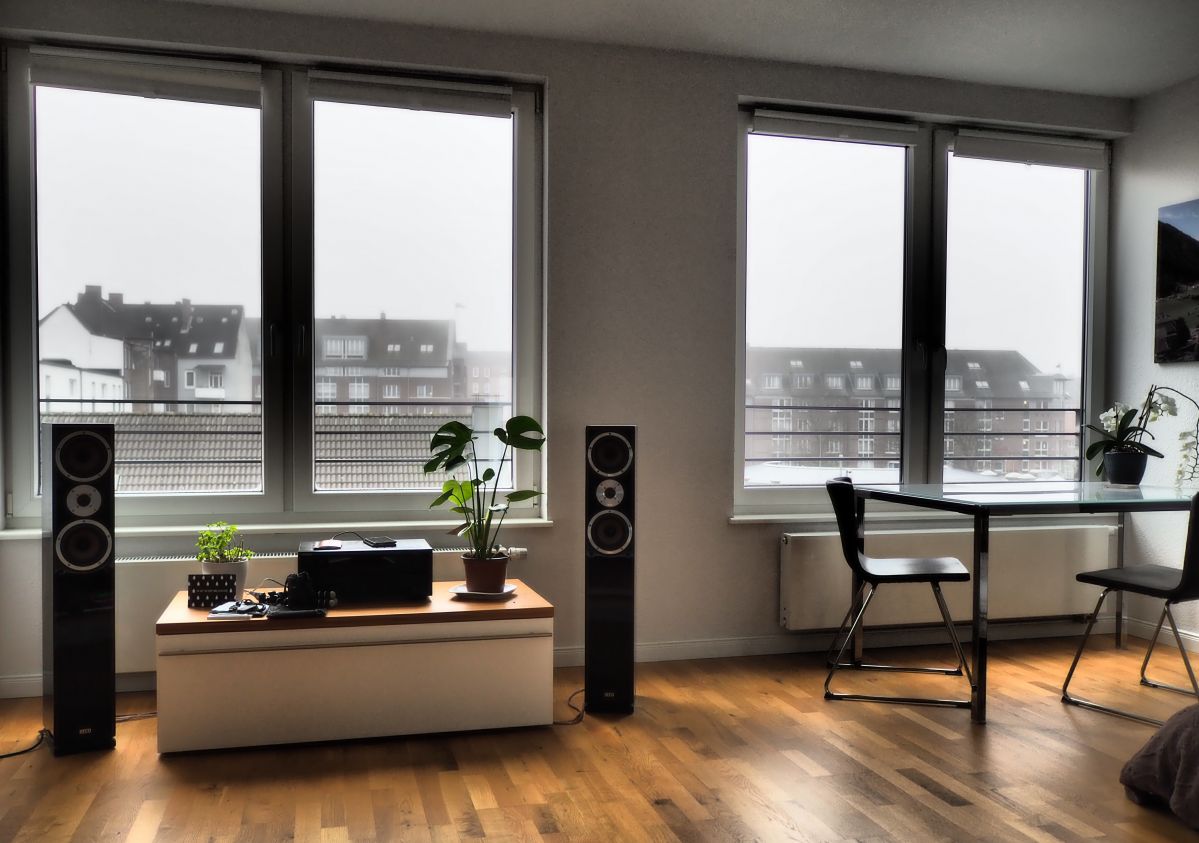

Photo by Roxanne Joncas on Unsplash

Room with Ample Greenery


Photo by Prudence Earl on Unsplash

Wooden Bookshelf


Photo by Iñaki del Olmo on Unsplash

Cozy Loft


Photo by Aaron Huber on Unsplash

Bright Office Workspace


Photo by Toa Heftiba on Unsplash

Simple Bedroom with Wall Decor


Photo by Cats Coming from Pexels

Orange Wall with Sunlight


Photo by drmakete lab from Pexels

White Apartment Living Room


Photo by Vecislavas Popa from Pexels

Photo Frames on Wall


Photo by Medhat Ayad from Pexels

Spacious Open Office


Photo by Marc Mueller from Pexels

Need more background images? You can find more on Pexels and Unsplash. If you want to customise your own video call backgrounds, you can also visit Canva to do so. If you want more recommendations from us, do drop us a message on our socials. Till then, stay safe!

The article cover photo is by Cici Hung on Unsplash.


About the author
Corporate Tips
Meet FunJelly - The AI-Powered Revolution in Corporate Team Bonding

Meet FunJelly - The AI-Powered Revolution in Corporate Team Bonding

In an era where teams are scattered across home offices, skyscrapers, and different time zones, the traditional "office party" is no longer enough to keep a culture thriving. Companies are looking for more than just a distraction; they need meaningful connection. Enter FunJelly—a next-generation platform designed to bridge...
Not Every Meeting Needs a Full Buffet — What Teams Are Choosing Instead

Not Every Meeting Needs a Full Buffet — What Teams Are Choosing Instead

When it comes to planning office meetings, many companies still default to one option: a full buffet. But in today’s fast-paced work environment, that approach is quickly becoming outdated. Modern teams are rethinking how food fits into meetings. Instead of heavy, time-consuming buffet spreads, businesses are choosing...
QuickBuy@SGov x FoodLine - Making Government Purchases Easier for Public Officers

QuickBuy@SGov x FoodLine - Making Government Purchases Easier for Public Officers

We’re excited to share that FoodLine now supports QuickBuy@SGov, a Singapore Government initiative that enables public service officers with corporate billing accounts to make small value purchases quickly and seamlessly through participating digital platforms like FoodLine. This means that if you have a QuickBuy@SGov corporate billing account, you can...
Smart Ways to Save on Catering Orders in Singapore

Smart Ways to Save on Catering Orders in Singapore

...
Discover These Newly Added Caterers on FoodLine!

Discover These Newly Added Caterers on FoodLine!

Looking to try something new for your next gathering, office lunch, or celebration? FoodLine has recently welcomed several exciting caterers to the platform — offering everything from handcrafted dim sum and premium sushi experiences to nostalgic baked favourites. Here are 3 newly added caterers you should definitely...
Recently Added Caterers on FoodLine SG You Should Try

Recently Added Caterers on FoodLine SG You Should Try

Looking to try something new on FoodLine Singapore? From Korean kimbap and handcrafted desserts to confinement meals and local zi char favourites, several newly added caterers are now available for delivery and catering orders. Whether you are planning a gathering, craving comfort food, or searching for healthier meal...
A customer just ordered for 3 pax for 13th May
Note: To claim your $10 discount, please follow the steps below:

iPhone Users Exclusive - How to claim $10 Off with FoodLine

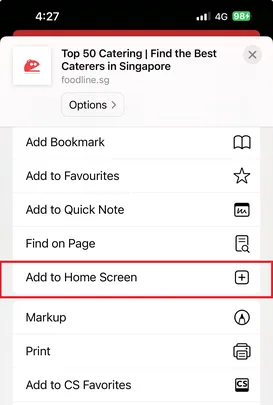
Step 1: Tap the share icon on iPhone and then Add to Home Screen
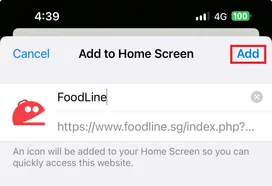
Step 2: Tap Add
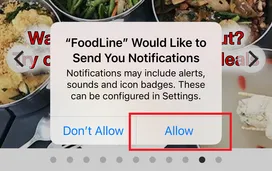
Step 3: Open the FoodLine App, and tap Allow. The promo code will then be sent to you via Notifications.
Home
Promos
731
Menus
999+
Contact Us
Account
FoodLine 100% Satisfaction Guarantee!
WhatsApp us