Biggest Discounts
All Merchant Menus cheaper than anywhere else!

Get $5 Coupon Code (no min. spend) Sign up now

Top
Should You Avoid Sleeping With Lights On?

Should You Avoid Sleeping With Lights On?

I grew up with the term "lights out" as an indication for me to go to bed. Yes the term "lights out" simply means to switch off the lights and sleep in the dark.

You must be wondering, "Is it that bad to sleep with lights on?". The answer is yes and it can affect you in many ways.

Photo by Pim Chu on Unsplash

By exposing yourself to light when you are sleeping, it makes it difficult for your brain from getting a good and deep sleep. Also, if you have lack of sleep due to the light exposure, this can cause certain side effects.

  • Depression

Studies shown that, sleeping with lights on can contribute to depression, this is especially so for blue light from electronic devices.


  • Obesity

It is highlighted that the lesser sleep you get, the tendency for you to eat during the next day will be higher. By eating more, you are also messing up your own meals timing.


When Is It Okay To Sleep With Lights On?

Sleeping with lights on may only be beneficial if you are taking a quick nap during the day and do not want to fall deep into sleep. However, this method doesn't determine the quality of sleep.

Even if you are used to sleeping with lights on, by doing so, you may not get enough Rapid Eye Movement(REM) sleep.

Ultimately, we all want to get a good and deep sleep so that we can have enough energy to persevere through the next day. Remember that a lack of sleep can drastically affect your mood and you might even feel easily irritated.


Till then, take care and stay safe!


Featured Image Credits  To:

Photo by Bastien Jaillot on Unsplash


About the author
Tips / Wellness
Smart Ways to Save on Catering Orders in Singapore

Smart Ways to Save on Catering Orders in Singapore

...
Meet FunJelly - The AI-Powered Revolution in Corporate Team Bonding

Meet FunJelly - The AI-Powered Revolution in Corporate Team Bonding

In an era where teams are scattered across home offices, skyscrapers, and different time zones, the traditional "office party" is no longer enough to keep a culture thriving. Companies are looking for more than just a distraction; they need meaningful connection. Enter FunJelly—a next-generation platform designed to bridge...
What Makes Catering “High-End”? A Quick Guide for Hosts

What Makes Catering “High-End”? A Quick Guide for Hosts

When planning an event, you’ve probably come across the term “high-end catering.” But what does it really mean? Is it just about higher prices—or is there more to it? In reality, high-end catering is about creating a complete dining experience, not just serving...
Testing Out On & On Diners' $11.90 Buffet Spread

Testing Out On & On Diners' $11.90 Buffet Spread

Let’s be real—ordering a buffet in Singapore is always a bit of a gamble. You’re usually praying the food doesn't turn up lukewarm, dry, or completely bland. So when the team at On & On Diners sent over a full buffet setup from their ...
Last Call for Father's Day Menus Promo T&Cs (Mailing List Exclusive)

Last Call for Father's Day Menus Promo T&Cs (Mailing List Exclusive)

How to use your coupon code?
 Step 1: Order from any Father's Day catering menus listed in the mailing list on FoodLine.
 Step 2: Before placing your order, indicate the Coupon Code in the “Coupon Code” field. (Can be found in the email)
 Step 3: After your event, go to the cash reward page....
SHOP.COM July & August Deals Campaign 2026

SHOP.COM July & August Deals Campaign 2026

How to Use Your Coupon Code?  Step 1: Order from any of the caterers on FoodLine.  Step 2: Before placing your order, indicate the Coupon Code in the “Coupon Code” field.  Step 3: After your event, go to the cash reward page. Follow the instructions to submit your invoice and review. We will...
A customer just ordered for 3 pax for 19th Jun
Note: To claim your $10 discount, please follow the steps below:

iPhone Users Exclusive - How to claim $10 Off with FoodLine

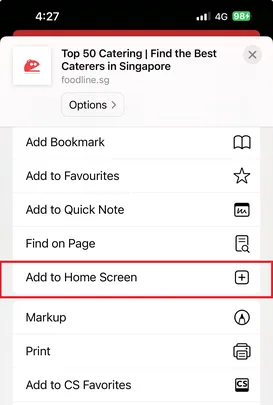
Step 1: Tap the share icon on iPhone and then Add to Home Screen
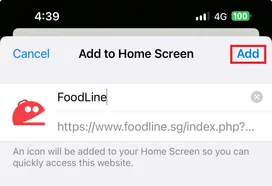
Step 2: Tap Add
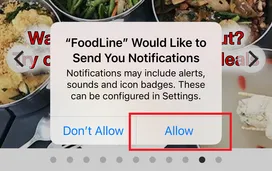
Step 3: Open the FoodLine App, and tap Allow. The promo code will then be sent to you via Notifications.
Home
Promos
962
Menus
999+
Chat / Call
Chat / Call
Account