-(2) (1).jpg/838x438-cover.webp "FoodLine.sg's Purchase with Purchase FAQs")
FoodLine.sg's Purchase with Purchase FAQs
Some Frequently Asked Questions
How does PWP (Purchase With Purchase) work?
Purchase with purchase allows you to purchase selected merchant’s products at the exclusive promotional prices with just minimum spending of $30 on FoodLine.
EG: Upon your first purchase from Merchant A, you will receive an order code (FL0000000001AQ) via email & SMS. This code is required for your subsequent order, to get the PWP promotion on FoodLine.
Why do I require an order code to purchase PWP items?
This is for us to verify if you are eligible to purchase the PWP items.
How do I Purchase the PWP items?
You can proceed to purchase the selected item as per usual, just make sure you have an order code with you ready. As it is mandatory to input the code prior to any payment.
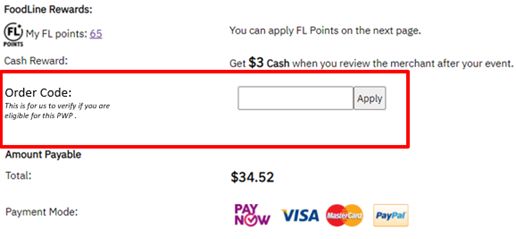
Can I make payment for Merchant A item & PWP item together?
No. This is because we require to verify the order code before you can proceed to purchase the PWP items.
Where can I find the current PWP Menus/Items?
You can find all the PWP Menus below (We will keep this page updated where you can find all the PWP promotions)
- Dessert Monster Bundle Menu - https://www.foodline.sg/catering/Dessert-Monster/25961-Purchase-with-Purchase--Dessert-Menu/AlaCarteOrderP
- Chow Zan Bundle Menu - https://www.foodline.sg/DirectOrderAlacarteNew.php?packageId=25958
Alternatively, after any of your purchase on FoodLine on the last landing page, you will be able to PWP Promotions menus link too.
Start ordering and saving with FoodLine today! :)


.webp "Mini Buffet Catering for 10–15 Pax in Singapore: Best Options for Small Groups From $11.90/pax!")

 and revisit our site to complete the process.